How to delete your RideBrisa account
How to delete your RideBrisa account
You can permanently delete your RideBrisa account at any time from within the mobile app. Follow the steps below.
Simple, sustainable, and built for your community. Discover how we transform your daily trips.
Simple, sustainable, and built for your community. Discover how we transform your daily trips.
Important!
Important!
Please note that deleting your account is permanent and cannot be undone. Your RideBrisa profile, ride history, saved preferences, active subscriptions, and any activated access passes will be removed or cancelled.
Please note that deleting your account is permanent and cannot be undone. Your RideBrisa profile, ride history, saved preferences, active subscriptions, and any activated access passes will be removed or cancelled.
Step 1: Open Personal details
Step 1: Open Personal details
Sign in to the RideBrisa app and open the My account menu.
Select Personal details to view your account information and account management options.
Sign in to the RideBrisa app and open the My account menu.
Select Personal details to view your account information and account management options.

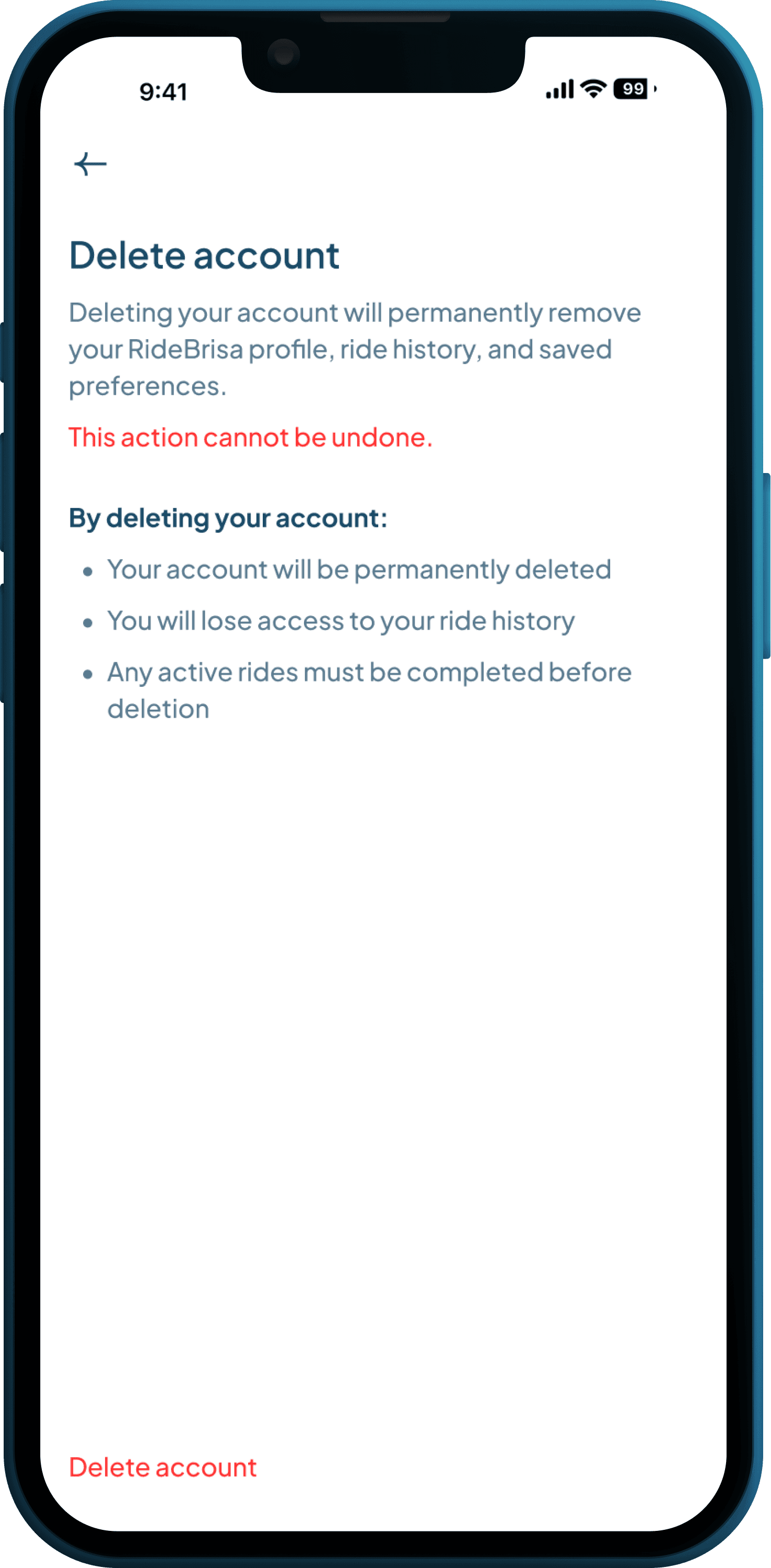
Step 2: Select Delete account
Step 2: Select Delete account
On the Personal details page, scroll down and select Delete account.
On the Personal details page, scroll down and select Delete account.
You will be taken to a dedicated page explaining what happens when your account is deleted.
You will be taken to a dedicated page explaining what happens when your account is deleted.
Before continuing, make sure that any active rides have been completed.
Step 3:Confirm the deletion
Step 3:Confirm the deletion
Select Delete account again at the bottom of the page.
A confirmation window will appear.
To proceed, select Delete account in the confirmation window.
To cancel, select Keep my account or close the window.
Select Delete account again at the bottom of the page.
A confirmation window will appear.
To proceed, select Delete account in the confirmation window.
To cancel, select Keep my account or close the window.

What happens next
What happens next
Once you confirm the deletion:
Your account will be deleted immediately.
Your account will be deleted immediately.
You will be logged out of the RideBrisa app.
You will be logged out of the RideBrisa app.
Your profile, ride history, and saved preferences will be removed.
Your profile, ride history, and saved preferences will be removed.
Any active subscriptions will be cancelled.
Any active subscriptions will be cancelled.
Any activated access passes will be cancelled.
Any activated access passes will be cancelled.
You will be taken to the app’s sign-up screen.
You will be taken to the app’s sign-up screen.
You will need to create a new account to use RideBrisa again.
Effortless electric rides, designed for everyday life at Higuerón.
RideBrisa is powered by Brisa Mobility
Effortless electric rides, designed for everyday life at Higuerón.
RideBrisa is powered by Brisa Mobility
Effortless electric rides, designed for everyday life at Higuerón.
RideBrisa is powered by Brisa Mobility